Moved the file server?
Fix every broken Office link in one pass.
Link Migrator scans whole folders of Excel, Word and PowerPoint files, shows every link that points at the old location, and rewrites them to the new one. No macros. No uploads. Originals untouched.

Windows 10 and 11 · No Office or Python needed · Scanning is free, forever
Demo video transcript (72 seconds, no sound)
- Title: "Moved the file server? Every Excel, Word and PowerPoint link still points at the old one."
- Excel opens a workbook whose formula reads
='\\oldsrv\finance\[Rates 2023.xlsx]Sheet1'!A1; its cells show #REF!. Caption: Excel's own tools fix one workbook at a time, and ignore Word and PowerPoint. - Link Migrator scans
C:\Demo\Contoso Share: 45 files, 141 links, each listed with its file, kind, target and status. Dead servers time out after 3 seconds, so the scan never hangs. - Map tab: two rules are typed,
\\oldsrv\financeto\\newsrv\fin, andS:\to a SharePoint address. Preview: 106 planned changes, counted per rule and per file. Nothing is written yet. - Apply tab: corrected copies go to
C:\Demo\Contoso Share - relinked; the progress bar runs through 38 files, each verified. Originals are never touched. - Excel opens the rewritten copy with no repair prompt; the formula now reads
='\\newsrv\fin\[Rates 2023.xlsx]Sheet1'!A1. Values refresh once the new server is reachable. - "Originals untouched. Files never leave your PC. The only internet connection is licence checks."
- End card: "Link Migrator. Find and fix every broken Office link after a file-server or SharePoint move. Scan free."
The problem
"There is no automatic way to find all workbook links in a workbook."
After a migration, every file that pointed at \\oldsrv\... breaks at the same time:
- Excel workbook links, including ones hidden in defined names and charts
- Hyperlinks in cells, documents and slides
- Linked pictures, linked media and embedded-object links
- Word field codes and attached templates that make documents open slowly
Excel's own Workbook Links pane works one workbook at a time and ignores Word and PowerPoint. The usual fixes are hunting by hand, VBA macros that IT policy often forbids, or enterprise software sold through a sales call.
How it works
1. Scan (free)
Point it at a folder. Get a report of every external link in every file: where it lives, what it points to, and whether the target exists.
2. Map
Enter one table: old location → new location. UNC paths, mapped drives and SharePoint URLs all work. Preview the exact change count per rule and per file.
3. Apply
Corrected copies are written to a separate folder and each one is verified. Swap them in when you are happy.
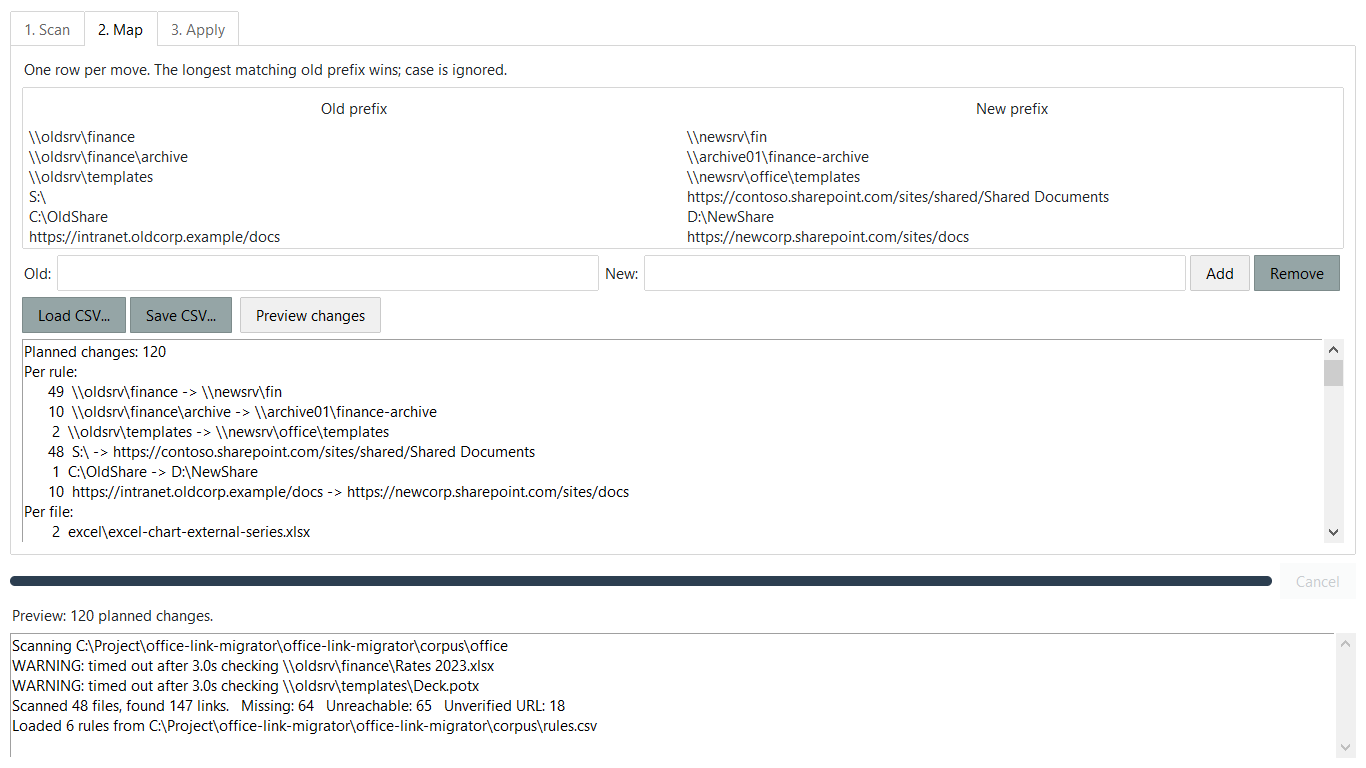
Screenshot from the full sample set (six rules, 120 planned changes). The demo video above uses a smaller share with two rules, hence 106.
Why technicians trust it with client files
- Originals are never modified by default. In-place mode writes a backup ZIP first.
- Only the link changes. Macros, formatting, images and everything else are copied byte for byte.
- Every output is verified before it is kept. A file that fails is discarded and reported.
- Files never leave the PC. No cloud, no telemetry. The only internet connection the app makes is to activate and occasionally re-check your licence. Checking whether a link target exists only touches your own servers, the same as opening the folder in Explorer.
- Scriptable. A command line with clear exit codes for RMM tools and batch jobs.
What it covers
| Excel | Word | PowerPoint | |
|---|---|---|---|
| Hyperlinks | Yes | Yes: body, headers, footers, footnotes | Yes: slides, layouts, masters, notes |
| Links to other files | Workbook links, pivot sources | Linked pictures, OLE links, field codes | Linked pictures, audio, video, OLE links |
| Hidden ones | Defined names, chart series | Attached template | None |
| Formats | .xlsx .xlsm | .docx .docm | .pptx .pptm |
Pricing
Free
$0
forever
- Scan folders, all formats
- Unlimited on-screen results
- Report export: first 200 links
- Preview changes (dry run)
Sold by our merchant of record, Dodo Payments, which handles payment, tax and invoices and emails your licence key. Try the free preview first. Contact us within 14 days for a full refund if the key is unused or the tool does not work on your files. Prices in USD; tax added at checkout where it applies.
FAQ
- Is it safe to run on live shares?
- Yes. By default it only reads your files and writes copies elsewhere.
- Does it work for SharePoint migrations?
- Yes: map a share or drive letter to the SharePoint URL. Web addresses are not existence-checked.
- Do I need Office installed?
- No.
- What if a file can't be processed?
- It is listed with the reason and left alone.